Compromised 1Hope Account

Last updated: Jul 24, 2026
154
views

If you think your 1Hope Account may have been compromised:
Change Your Password
You can change your 1Hope Account password in your account settings. If you used your old password on other websites, change it there too.
Check for Suspicious Logins
- Log into your Email and scroll all the way down to the bottom of the page
- Click on Details (bottom right hand corner)
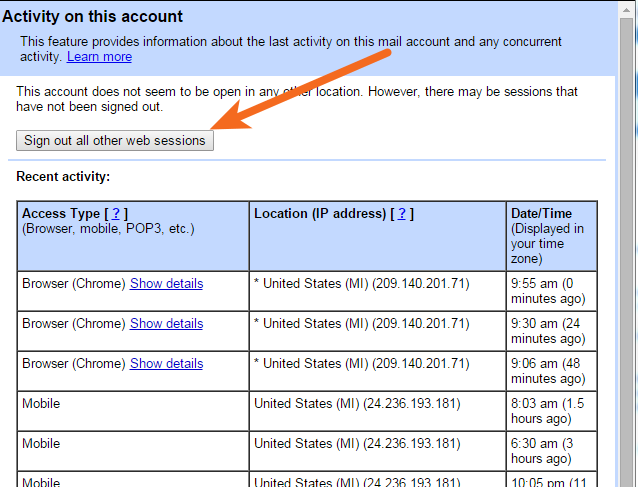
- Check to make sure all the “Location (IP address)” countries are places you recognize
- If you don’t recognize some of the locations, or if you are not sure these are your IP addresses, click on the button “Sign out all other sessions”
Check Your “Sent” Folder
Check messages in your Email’s “Sent” folder to see if there are any that you didn’t send
Check Your Email Settings
There are a couple of settings that an intruder may have changed
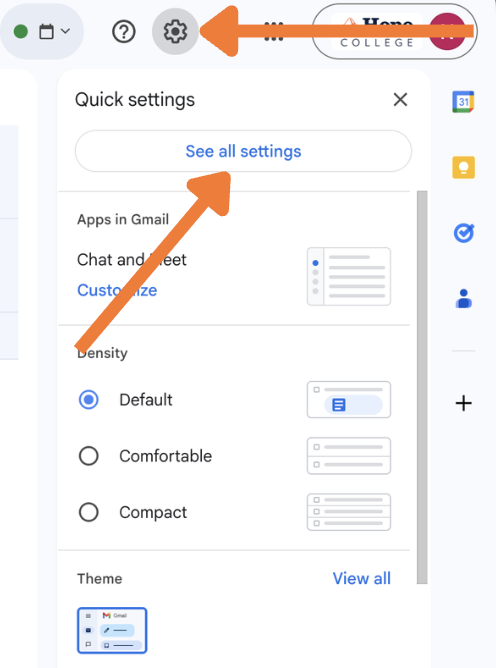
Click the  Settings gear and "Settings".
Under the General tab, scroll down and check to make sure your Signature is set the way you expect.
Also check the Accounts, Filters, and Forwarding and POP/IMAP tabs to make sure there are no suspicious looking email addresses or unrecognized settings.